Rust multi module microservices Part 6 - Books API
I hope you've reached this point, and now we'll begin creating our first microservice application: a books HTTP REST API with a single POST endpoint for adding a book. However, before we proceed, we must establish a migration setup for this service to store the book data in a database.
Migration
Let us install the sea-orm cli which has instructions to setup migration here.
cargo install sea-orm-cli
We will go into the books_api directory and initialise a migration
cd books_api && sea-orm-cli migrate init
After that, we will have a structure like below
migration
├── Cargo.toml
├── README.md
└── src
    ├── lib.rs                              # Migrator API, for integration
    ├── m20220101_000001_create_table.rs    # A sample migration file
    └── main.rs                             # Migrator CLI, for running manually
Update the Cargo.toml inside the newly created migration directory to have the following content.
[package]
name = "migration"
version = "0.1.0"
edition = "2021"
publish = false

[lib]
name = "migration"
path = "src/lib.rs"

[dependencies]
tokio = { workspace = true }
[dependencies.sea-orm-migration]
version = "^0"
features = [
    "runtime-tokio-rustls", "sqlx-postgres"
]
By default, an initial create table migration file is setup for us and let us update it to create a book table. You can do much more and please follow the sea-orm documentation of the possibilities like seeding with initial data, enums, etc. I am just scratching the top surface here.
use sea_orm_migration::prelude::*;

#[derive(DeriveMigrationName)]
pub struct Migration;

#[async_trait::async_trait]
impl MigrationTrait for Migration {
    async fn up(&self, manager: &SchemaManager) -> Result<(), DbErr> {
        manager
            .create_table(
                Table::create()
                    .table(Book::Table)
                    .if_not_exists()
                    .col(
                        ColumnDef::new(Book::Id)
                            .integer()
                            .not_null()
                            .auto_increment()
                            .primary_key(),
                    )
                    .col(ColumnDef::new(Book::Title).string().unique_key().not_null())
                    .col(ColumnDef::new(Book::Isbn).string().not_null())
                    .to_owned(),
            )
            .await
    }

    async fn down(&self, manager: &SchemaManager) -> Result<(), DbErr> {
        manager
            .drop_table(Table::drop().table(Book::Table).to_owned())
            .await
    }
}

/// Learn more at https://docs.rs/sea-query#iden
#[derive(Iden)]
enum Book {
    Table,
    Id,
    Title,
    Isbn,
}
We can run the migrations by navigating to the migration directory and checkout the README.md that got generated for available commands.
Terminal 1
docker compose up
Terminal 2
cd books_api/migration # Press enter
DATABASE_URL=postgres://postgres:postgres@localhost:5433/rust-superapp cargo run
books-api/Cargo.toml
Let's update the books_api Cargo.toml to include all the necessary dependencies
[package]
name = "books_api"
version = "0.0.0"
edition = "2021"

# See more keys and their definitions at https://doc.rust-lang.org/cargo/reference/manifest.html

[dependencies]
migration = { path = "migration" }
database = { path = "../database" }
tokio = { workspace = true }
tracing = { workspace = true }
tracing-subscriber = { workspace = true }
serde = { workspace = true }
sea-orm = { workspace = true }
derive_builder = { workspace = true }
thiserror = { workspace = true }
testcontainers = { workspace = true }
kafka = {path = "../kafka"}
common = {path = "../common"}
axum = {workspace = true}
serde_json = {workspace = true}
opentelemetry = {workspace = true}
axum-tracing-opentelemetry = {workspace = true}
opentelemetry-zipkin = {workspace = true}
tracing-opentelemetry = {workspace = true}
schema_registry_converter = {workspace = true}
apache-avro = {workspace = true}
Aside from the 'workspace = true' dependencies, we have now added four more path-based dependencies. If you recall, we are currently sharing our common, Kafka, and database library crates. 🎉
Structure
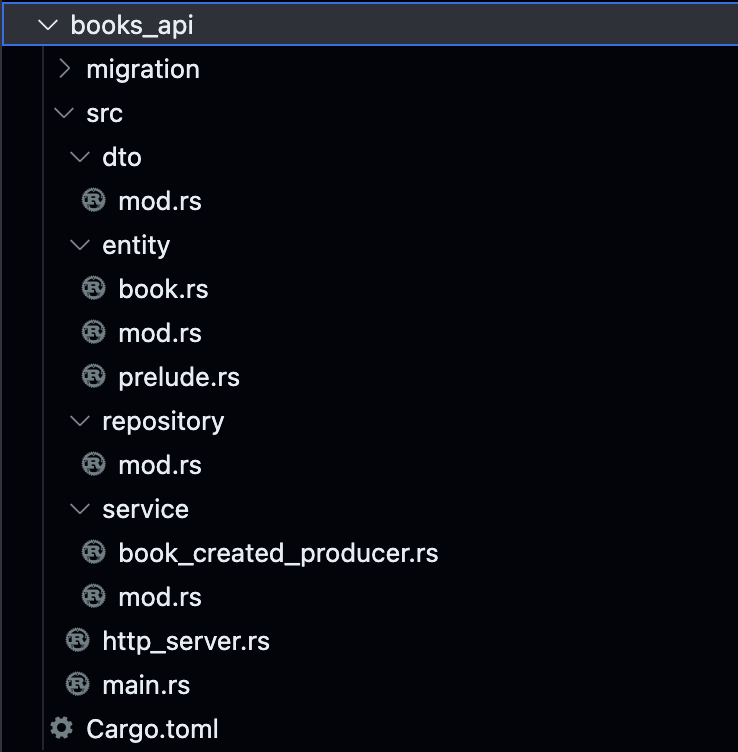
Go ahead and create the necessary folders & files inside books_api as you see above except the entity directory and we will start the implementation.
Entity
Let's start by creating the entities that will be used to map with the database table for CRUD operations. However, the best part is that we don't need to write them manually; instead, we can generate them. Run the following command to generate the entities. (Note: For this to work, the migrations mentioned above should have been run.)
cd books_api # Make sure you are here inside books_api directory
sea-orm-cli generate entity -u postgres://postgres:postgres@localhost/rust-superapp --with-serde both -o ./src/entity
This command will generate the entity directory containing three files: book.rs, mod.rs, and prelude.rs. Upon inspection, the files should be self-explanatory. If you choose to use this auto-generation method, it is recommended not to edit the files manually, as any future generations will overwrite the manual changes. However, you can also create your own entities by following the SeaORM documentation provided here.
DTO
Update the src/dto/mod.rs file with the following code, which creates a domain object representing a book. This structure will be utilized for any business logic and will not be used for database or Kafka messages. This approach offers a solid abstraction between the domain and infrastructure, inherently allowing us to make future refactoring with fewer issues.
use derive_builder::Builder;
use serde::{Deserialize, Serialize};

#[derive(Serialize, Deserialize, Builder, Debug)]
pub struct Book {
    pub id: i32,
    pub title: String,
    pub isbn: String,
}
Repository
Update the src/repository/mod.rs with the following code, which holds methods for saving a book to the database. Here we also run the migration whenever the repository is initialised so that this process automatically keeps our database state in sync with the application entity structure. If any error, the application startup will fail indicating a dirty state which can be rectified and redeployed.
use crate::entity::book::{ActiveModel as BookActiveModel, Model as BookModel};
use migration::{Migrator, MigratorTrait};
use sea_orm::ActiveValue::Set;
use sea_orm::{ActiveModelTrait, DatabaseConnection, DbErr};
use std::sync::Arc;
use thiserror::Error;

#[derive(Clone)]
pub struct Repository {
    database_connection: Arc<DatabaseConnection>,
}

#[derive(Error, Debug)]
pub enum RepositoryError {
    #[error("Database error")]
    DatabaseError(#[from] DbErr),
}

impl Repository {
    pub async fn new(database_connection: DatabaseConnection) -> Result<Self, RepositoryError> {
        Migrator::up(&database_connection, None)
            .await
            .map_err(|e| RepositoryError::DatabaseError(e))?;
        Ok(Self {
            database_connection: Arc::new(database_connection),
        })
    }

    pub async fn create_book(
        &self,
        title: String,
        isbn: String,
    ) -> Result<BookModel, RepositoryError> {
        let created_book = BookActiveModel {
            title: Set(title),
            isbn: Set(isbn),
            ..Default::default()
        };
        created_book
            .insert(self.database_connection.as_ref())
            .await
            .map_err(|e| RepositoryError::DatabaseError(e))
    }
}

#[cfg(test)]
mod tests {
    use crate::repository::Repository;
    use database::get_connection;
    use testcontainers::{clients, images};

    #[tokio::test]
    async fn test_create_book() {
        let docker = clients::Cli::default();
        let database = images::postgres::Postgres::default();
        let node = docker.run(database);
        let connection_string = &format!(
            "postgres://postgres:postgres@127.0.0.1:{}/postgres",
            node.get_host_port_ipv4(5432)
        );
        let database_connection = get_connection(connection_string).await.unwrap();
        let repository = Repository::new(database_connection.clone()).await.unwrap();
        let title = "TITLE".to_string();
        let isbn = "ISBN".to_string();
        let created_book = repository
            .create_book(title.clone(), isbn.clone())
            .await
            .unwrap();
        assert_eq!(created_book.title, title.clone());
        assert_eq!(created_book.isbn, isbn.clone());
    }

    #[tokio::test]
    async fn test_create_book_title_unique() {
        let docker = clients::Cli::default();
        let database = images::postgres::Postgres::default();
        let node = docker.run(database);
        let connection_string = &format!(
            "postgres://postgres:postgres@127.0.0.1:{}/postgres",
            node.get_host_port_ipv4(5432)
        );
        let database_connection = get_connection(connection_string).await.unwrap();
        let repository = Repository::new(database_connection.clone()).await.unwrap();
        let title = "TITLE".to_string();
        let isbn = "ISBN".to_string();
        let created_book1 = repository
            .create_book(title.clone(), isbn.clone())
            .await
            .unwrap();
        assert_eq!(created_book1.title, title.clone());
        assert_eq!(created_book1.isbn, isbn.clone());

        let created_book2_result = repository.create_book(title.clone(), isbn.clone()).await;
        assert!(created_book2_result.is_err());
    }
}
The code starts with some import statements and declarations of external dependencies and custom modules.
The
Repositorystruct is defined with a single fielddatabase_connection, which is anArc(atomic reference-counted) wrapper around aDatabaseConnection. TheArcallows multiple references to the same connection, facilitating concurrent usage.The
RepositoryErrorenum is defined using thethiserrorcrate to represent errors that can occur during database operations. In this case, it only includes a single variantDatabaseError, which wraps aDbErr(database error) obtained from thesea_ormlibrary.The
Repositorystruct has an implementation block that contains the implementation of its methods.The
newmethod is an asynchronous constructor that takes aDatabaseConnectionas a parameter and initializes the repository. It performs a database migration using theMigratorfrom themigrationmodule, handling any errors encountered during migration.The
create_bookmethod creates a new book in the database with the given title and ISBN. It constructs aBookActiveModelinstance with the provided values and inserts it into the database using theinsertmethod fromsea_orm. Any errors encountered during the database operation are mapped to aRepositoryError.
Inside the
testsmodule, there are two test functions:The
test_create_bookfunction tests thecreate_bookmethod by setting up a PostgreSQL database in a Docker container, establishing a connection to it, creating a repository instance, and calling thecreate_bookmethod with some test data. It asserts that the returned book model has the same title and ISBN as the provided input.The
test_create_book_title_uniquefunction tests the uniqueness constraint of thetitlefield by creating a book with a specific title and ISBN, and then attempting to create another book with the same title and ISBN. It asserts that the second create operation fails and returns an error.
In summary, the code defines a repository pattern for interacting with a database, specifically for creating books. It provides an asynchronous constructor for initializing the repository and a method for creating books in the database. The tests ensure that the repository functions correctly by setting up a PostgreSQL database in a Docker container and performing various assertions on the repository's behavior.
Book Created Kafka Producer
We can now add the implementation of kafka producer to publish details about the newly created book under src/service/book_created_producer.rs
use common::events::{
    constants::Topics,
    dto::{CreatedBookBuilder, CreatedBookBuilderError},
};
use kafka::producer::KafkaProducer;
use thiserror::Error;

#[derive(Clone)]
pub struct BookCreatedProducer {
    producer: KafkaProducer,
}

#[derive(Error, Debug)]
pub enum BookCreatedProducerError {
    #[error("CreatedBookBuilderError error")]
    CreatedBookBuilderError(#[from] CreatedBookBuilderError),
}

impl BookCreatedProducer {
    pub fn new(bootstrap_servers: String, schema_registry_url: String) -> Self {
        Self {
            producer: KafkaProducer::new(
                bootstrap_servers,
                schema_registry_url,
                Topics::BookCreated.to_string(),
            ),
        }
    }

    pub async fn publish_created_book(
        &self,
        id: i32,
        title: String,
        isbn: String,
    ) -> Result<bool, BookCreatedProducerError> {
        let created_book = CreatedBookBuilder::default()
            .id(id)
            .title(title)
            .isbn(isbn)
            .build()
            .map_err(|e| BookCreatedProducerError::CreatedBookBuilderError(e))?;
        Ok(self.producer.produce(id.to_string(), created_book).await)
    }
}
The code begins with some import statements, including dependencies from the
commonandkafkamodules.The
BookCreatedProducerstruct is defined with a single fieldproducer, which is an instance ofKafkaProducerresponsible for sending messages to Kafka.The
BookCreatedProducerErrorenum is defined using thethiserrorcrate to represent errors that can occur during the process of publishing a created book event. It includes a single variantCreatedBookBuilderError, which wraps an error from theCreatedBookBuildermodule.The
BookCreatedProducerstruct has an implementation block that contains the implementation of its methods.The
newmethod is a constructor that takesbootstrap_servers,schema_registry_url, andTopics::BookCreatedas parameters. It initializes theproducerfield with a new instance ofKafkaProducerconfigured with the provided parameters.The
publish_created_bookmethod is an asynchronous method that publishes a book creation event to Kafka. It takesid,title, andisbnas parameters. It uses theCreatedBookBuilderto construct aCreatedBookdata transfer object (DTO) with the provided values. If the builder fails to construct the DTO, the error is mapped to aBookCreatedProducerError. Otherwise, thecreated_bookis passed to theproducemethod of theproducerto publish it to Kafka. The result of the produce operation is returned as aResult<bool, BookCreatedProducerError>.
In summary, the code defines a BookCreatedProducer struct that uses a KafkaProducer to publish book creation events to a Kafka topic. It provides a constructor for initializing the producer and a method for publishing a created book event to Kafka. Any errors encountered during the process are captured and represented as a custom BookCreatedProducerError enum.
Service
Update the src/service/mod.rs with the below code
pub mod book_created_producer;
use self::book_created_producer::{BookCreatedProducer, BookCreatedProducerError};
use crate::dto::{Book, BookBuilder, BookBuilderError};
use crate::repository::{Repository, RepositoryError};
use std::sync::Arc;
use thiserror::Error;
use tracing::{info_span, Instrument};

#[derive(Clone)]
pub struct Service {
    repository: Repository,
    book_created_producer: Arc<BookCreatedProducer>,
}

#[derive(Error, Debug)]
pub enum ServiceError {
    #[error("Repository error")]
    RepositoryError(#[from] RepositoryError),

    #[error("BookBuilder error")]
    BookBuilderError(#[from] BookBuilderError),

    #[error("BookCreatedProducer error")]
    BookCreatedProducer(#[from] BookCreatedProducerError),
}

impl Service {
    pub fn new(repository: Repository, book_created_producer: BookCreatedProducer) -> Self {
        Self {
            repository,
            book_created_producer: Arc::new(book_created_producer),
        }
    }

    pub async fn create_and_publish_book(
        &self,
        title: String,
        isbn: String,
    ) -> Result<Book, ServiceError> {
        let span = info_span!("create_and_publish_book repository create_book");
        let created_book_model = async move {
            let created_book_model = self
                .repository
                .create_book(title, isbn)
                .await
                .map_err(|e| ServiceError::RepositoryError(e));
            return created_book_model;
        }
        .instrument(span)
        .await?;
        let producer = self.book_created_producer.clone();
        let created_book_id = created_book_model.clone().id;
        let created_book_title = created_book_model.clone().title;
        let created_book_isbn = created_book_model.clone().isbn;
        let _ = tokio::task::spawn(async move {
            let _ = producer
                .publish_created_book(created_book_id, created_book_title, created_book_isbn)
                .await;
        })
        .instrument(info_span!("publish_created_book"));

        let book = BookBuilder::default()
            .id(created_book_model.id)
            .title(created_book_model.title)
            .isbn(created_book_model.isbn)
            .build()
            .map_err(|e| ServiceError::BookBuilderError(e))?;
        Ok(book)
    }
}
The code begins with some import statements, including dependencies from various modules.
The
Servicestruct is defined with two fields:repositoryof typeRepositoryandbook_created_producerof typeArc<BookCreatedProducer>. Therepositoryfield is used to interact with the book repository, while thebook_created_producerfield is used to publish book creation events.The
ServiceErrorenum is defined using thethiserrorcrate to represent errors that can occur during book creation and publishing. It includes three variants:RepositoryErrorto wrap errors from theRepositorymodule,BookBuilderErrorto wrap errors from theBookBuildermodule, andBookCreatedProducerto wrap errors from theBookCreatedProducermodule.The
Servicestruct has an implementation block that contains the implementation of its methods.The
newmethod is a constructor that takes arepositoryof typeRepositoryandbook_created_producerof typeBookCreatedProduceras parameters. It initializes the respective fields of theServicestruct.The
create_and_publish_bookmethod is an asynchronous method responsible for creating and publishing a book. It takestitleandisbnas parameters. It begins by creating an information span for logging purposes. Inside the span, it calls thecreate_bookmethod of therepositoryto create a book model. If an error occurs during the repository operation, it is mapped to aRepositoryErrorand returned. The book creation and repository operation are instrumented with the span. Next, thebook_created_produceris cloned to be used later for publishing the created book. The book's ID, title, and ISBN are extracted from the created book model. A new Tokio task is spawned to asynchronously publish the created book using thebook_created_producer. The task is instrumented with a new information span. Finally, aBookobject is constructed using theBookBuilderbased on the created book model, and it is returned as a successful result.
In summary, the code defines a Service struct that acts as a service layer for creating and publishing books. It uses a Repository to create books and a BookCreatedProducer to publish book creation events. Errors that can occur during the process are captured and represented as a custom ServiceError enum.
HTTP Server
We can add the HTTP Server implementation which exposes the POST endpoint to create a book which can be called by any client. Add the below code to http_server.rs
use crate::service::{Service, ServiceError};
use axum::{http::StatusCode, response::IntoResponse, routing::post, Extension, Json, Router};
use axum_tracing_opentelemetry::opentelemetry_tracing_layer;
use serde::{Deserialize, Serialize};
use serde_json::json;
use std::net::SocketAddr;
use tracing::error;

pub async fn start_http_server(service: Service) {
    let books_router = Router::new().route("/", post(create_book));
    let api_router = Router::new().nest("/books", books_router);
    let app = Router::new()
        .nest("/api", api_router)
        .layer(opentelemetry_tracing_layer())
        .layer(Extension(service));
    let addr = SocketAddr::from(([127, 0, 0, 1], 8080));
    axum::Server::bind(&addr)
        .serve(app.into_make_service())
        .await
        .unwrap()
}

impl IntoResponse for ServiceError {
    fn into_response(self) -> axum::response::Response {
        error!("Service Error {}", self);
        let (status, error_message) = match self {
            ServiceError::RepositoryError(re) => {
                (StatusCode::INTERNAL_SERVER_ERROR, re.to_string())
            }
            e => (StatusCode::INTERNAL_SERVER_ERROR, e.to_string()),
        };

        let body = Json(json!({ "error": error_message }));
        (status, body).into_response()
    }
}

#[derive(Serialize, Deserialize, Debug)]
struct CreateBookRequest {
    title: String,
    isbn: String,
}

#[derive(Serialize, Deserialize, Debug)]
struct CreateBookResponse {
    id: i32,
    title: String,
    isbn: String,
}

async fn create_book(
    Extension(service): Extension<Service>,
    Json(create_book_request): Json<CreateBookRequest>,
) -> impl IntoResponse {
    let created_book_result = service
        .create_and_publish_book(create_book_request.title, create_book_request.isbn)
        .await;
    return match created_book_result {
        Ok(created_book) => (
            StatusCode::CREATED,
            Json(json!(CreateBookResponse {
                id: created_book.id,
                title: created_book.title,
                isbn: created_book.isbn,
            })),
        ),
        Err(e) => (
            StatusCode::INTERNAL_SERVER_ERROR,
            Json(json!({ "error": e.to_string() })),
        ),
    };
}
The code begins with some import statements, including dependencies from various modules.
The
start_http_serverfunction is defined as an entry point for starting the HTTP server. It takes aserviceof typeServiceas a parameter. Inside the function, a router is created to handle book-related routes. The/booksroute is nested inside the/apiroute. The OpenTelemetry tracing layer is added to the router, and theserviceis passed as an extension to the router. The server is then bound to a socket address (127.0.0.1:8080), and the router is served using theaxum::Server.The
IntoResponsetrait is implemented for theServiceErrorenum. This trait allows converting theServiceErrorinto an Axum response. Inside the implementation, an error message is logged usingtracing::error!. Depending on the type of error, an appropriate HTTP status code and error message are determined. The error message is wrapped in a JSON response body. The resulting status code, body, and headers are returned as an Axum response.Two structs,
CreateBookRequestandCreateBookResponse, are defined for the request and response bodies of the create book API.The
create_bookfunction is the handler for the/api/booksPOST route, responsible for creating a book. It takes anExtensionofServiceand aJsonofCreateBookRequestas parameters. Inside the function, thecreate_and_publish_bookmethod is called on theserviceto create and publish the book. The result is matched using amatchexpression. If the book creation is successful, aCreateBookResponseis constructed with the book's ID, title, and ISBN, and it is returned as a JSON response with the status code201 CREATED. If an error occurs, an error message is returned as a JSON response with the status code500 INTERNAL SERVER ERROR.
In summary, the code sets up an HTTP server using the Axum framework to handle book creation requests. It defines routes, request/response structs, and error handling. The start_http_server function starts the server, and the create_book function is the handler for creating books. Errors are logged and converted into appropriate HTTP responses.
Main
ASSEMBLE !!
mod dto;
mod entity;
mod http_server;
mod repository;
mod service;

use crate::repository::Repository;
use apache_avro::AvroSchema;
use common::events::dto::CreatedBook;
use database::get_connection;
use http_server::start_http_server;
use kafka::util::register_schema;
use opentelemetry::global;
use service::{book_created_producer::BookCreatedProducer, Service};
use tracing_subscriber::{layer::SubscriberExt, util::SubscriberInitExt, EnvFilter};

#[tokio::main]
async fn main() -> Result<(), Box<dyn std::error::Error>> {
    opentelemetry::global::set_text_map_propagator(opentelemetry_zipkin::Propagator::new());
    let tracer = opentelemetry_zipkin::new_pipeline()
        .with_service_name("books_api".to_owned())
        .with_service_address("127.0.0.1:8080".parse().unwrap())
        .with_collector_endpoint("http://localhost:9411/api/v2/spans")
        .install_batch(opentelemetry::runtime::Tokio)
        .expect("unable to install zipkin tracer");
    let tracer = tracing_opentelemetry::layer().with_tracer(tracer.clone());

    let subscriber = tracing_subscriber::fmt::layer().json();

    let level = EnvFilter::new("debug".to_owned());

    tracing_subscriber::registry()
        .with(subscriber)
        .with(level)
        .with(tracer)
        .init();
    let database_connection =
        get_connection("postgres://postgres:postgres@localhost:5433/rust-superapp").await?;
    let repository = Repository::new(database_connection.clone())
        .await
        .expect("Error creating repository");
    let schema_registry_url = "http://localhost:8081".to_owned();
    let book_created_producer =
        BookCreatedProducer::new("localhost:9092".to_owned(), schema_registry_url.clone());
    let service = Service::new(repository, book_created_producer);

    register_schema(
        schema_registry_url,
        "book".to_string(),
        CreatedBook::get_schema(),
    )
    .await
    .expect("Error while registering schema");

    start_http_server(service).await;
    global::shutdown_tracer_provider();
    Ok(())
}
The code starts by importing various modules and dependencies.
Several modules are declared using the
modkeyword, which indicates that they are part of the current crate.The
mainfunction is defined as an asynchronous function and is marked with the#[tokio::main]attribute, indicating that it should be executed as the entry point of the program.The first line in the
mainfunction sets the text map propagator for OpenTelemetry to the Zipkin propagator.The code then initializes a Zipkin tracer pipeline by configuring the service name, service address, and collector endpoint. The pipeline is installed and assigned to the
tracervariable.Next, the
traceris used to create a tracing layer (tracing_opentelemetry::layer()) that is added to the subscriber.The subscriber is configured with a JSON formatter and an environment filter to determine the log level.
The subscriber is then initialized using
tracing_subscriber::registry().init().Database connection is established using the
get_connectionfunction from thedatabasemodule. The connection string is provided as an argument.A repository instance is created using the
Repository::newfunction, which takes the database connection as an argument.The schema registry URL is assigned to a variable.
An instance of
BookCreatedProduceris created, passing the Kafka bootstrap servers and the schema registry URL as arguments.An instance of the
Servicestruct is created, passing the repository and book created producer instances.The Avro schema for the
CreatedBookevent is registered with the schema registry using theregister_schemafunction.The HTTP server is started by calling the
start_http_serverfunction, passing theserviceinstance.After the server starts, the global tracer provider is shut down.
Finally, the
Ok(())expression is returned to indicate a successful execution of themainfunction.
In summary, the code sets up the necessary components for the application, including the database connection, tracing configuration, repository, Kafka producer, and HTTP server. It initializes the necessary dependencies, registers Avro schema, starts the HTTP server, and shuts down the tracer provider.
We have successfully developed the books_api, which can create a book and publish a message with schema validation using the schema registry, while ensuring comprehensive tracing. In the next section, we will focus on consuming this data in the books_analytics module.